Your employment information. You should be in control.
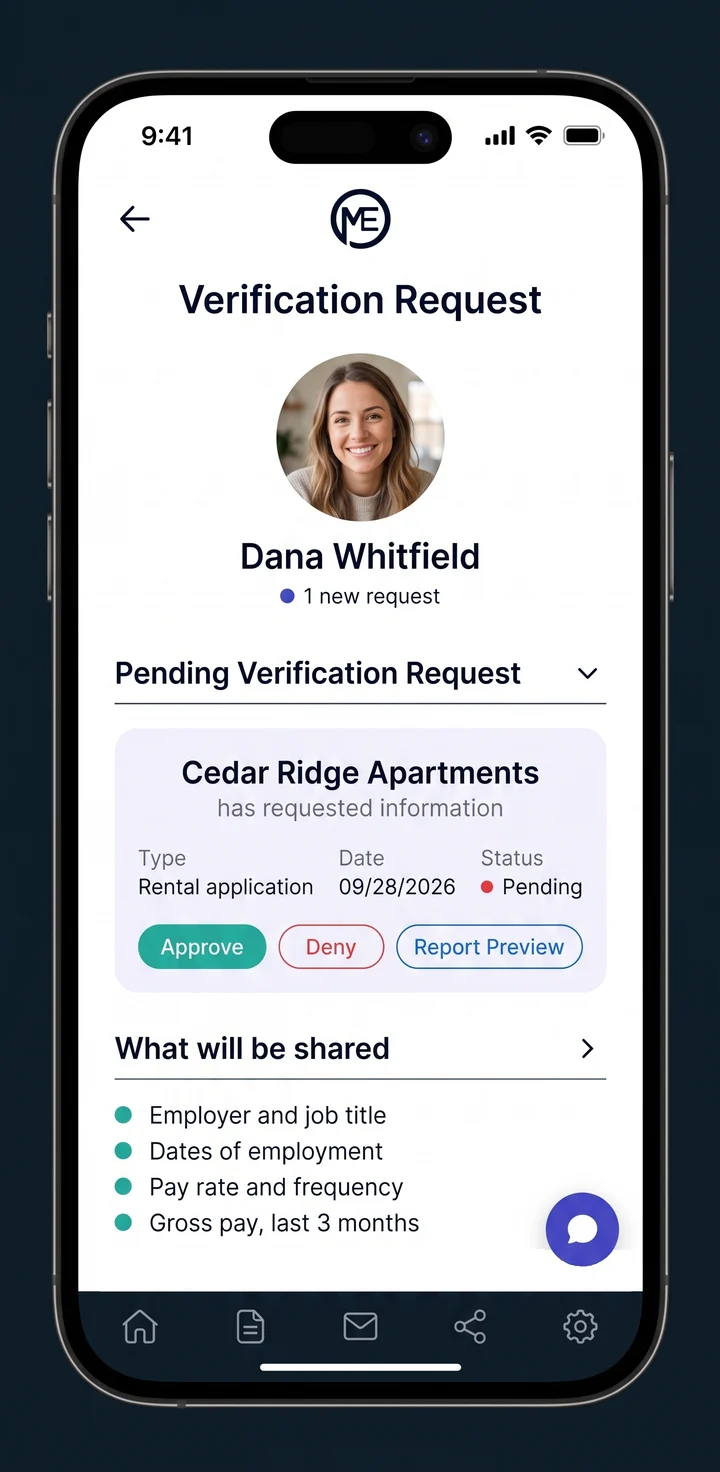
See who is asking, and approve, deny, or revoke each release through MyEmployment.
Native app on iOS and Android.
Authorization is not consent.
You apply to four apartments. Each application comes with a form, and you sign it, because that is how renting works. You get the first apartment and stop thinking about the other three.
Each of those applications can support its own screening. You may not receive real-time notice of what the other three obtained, or when.
The form you signed is an authorization: one signature, once, often in a stack of paperwork. Consent is different. It is current, it is specific to one request, and it is yours to take back.
You should be asked at the time of request. Not once, on a form you may not remember signing.
Four steps, all on your phone.
Here is what happens when a verifier sends a request through MyEmployment.
- 01
A request arrives
A lender, landlord, or program sends a request. You get a text or email link that opens the MyEmployment app, or you find it waiting in the app.
- 02
You see who is asking
The request shows who is asking, why, and exactly what they want to see.
- 03
You approve or deny
You get the chance to approve or deny each release. MyEmployment never releases your information to debt collectors or skip tracers without your permission.
- 04
You share from the source
Connect your payroll, gig, or bank account, or upload paystubs or W-2s. The verifier receives what the request asked for.
See every request, and what was released.
Every request that comes through MyEmployment shows up in the app: who asked, what they asked for, and when. After a release, you can see exactly what went to each verifier.

Who asked
Every verifier that sends you a request through MyEmployment, by name.
What they asked for
The information on each request, and the purpose it states.
What was released
The exact information that went to each verifier, and when.
Only the named verifier
MyEmployment releases your information only to the verifier named on the request.
Transparency means knowing who accessed your information. The app shows you.
Your login stays yours.
You sign in to your payroll, gig, or bank account the same way you always do.
Your credentials
Neither MyEmployment staff nor the verifier sees your payroll, gig, or bank login.
Your usual sign-in
Multi-factor sign-in works as it normally does.
More than one source
Paid by a W-2 job and a gig app? Connect both, and the verifier receives one report.
Can't sign in?
Upload paystubs or W-2s instead. The documents are extracted and reviewed.
Changed your mind? Take it back.
You can revoke access after a release. After that, the verifier can no longer refresh your information.
- Approve or denyYou get the chance to approve or deny each release.
- Debt collectors and skip tracersMyEmployment never releases your information to debt collectors or skip tracers without your permission.
- Revoke accessAccess ends for that verifier, and the refresh stops.
“For more than 30 years as a private investigator, I ran background checks. I watched verifications run on paperwork people signed and forgot about. You should be asked, every time.”
Your controls, answered.
Do I get a say in each release?
Yes. You get the chance to approve or deny each one. MyEmployment never releases your information to debt collectors or skip tracers without your permission.
Does MyEmployment see my payroll or bank login?
No. You sign in with your own credentials, and neither MyEmployment staff nor the verifier sees them.
How do I take access back?
You can revoke access through MyEmployment. After that, the verifier can no longer refresh your information.
Take control of your employment information.
Download the MyEmployment app to see and answer your requests.